A solo product case study covering discovery, product strategy, UX and visual design, browser-extension engineering, privacy, launch, and early product analytics.
At a glance
| Product | YomiSaver, a free Chrome extension for reading and studying Japanese on the web |
| My role | Solo product designer and developer |
| Timeline | Initial prototype: December 2024; major refactor and release work: July 2026; public launch: late July 2026 |
| Responsibilities | Problem discovery, product strategy, feature prioritisation, interaction and visual design, extension development, privacy and store compliance, release management, and post-launch analysis |
| Technology | JavaScript, HTML, CSS, Chrome Manifest V3, Webpack, Kuromoji.js, Jisho.org API, Chrome local and sync storage |
| Business model | Free, open source under MPL 2.0, no advertising, no subscriptions, no locked features, and optional Ko-fi support |
| First 30 days | 45 installs and one uninstall, with no paid acquisition or sustained marketing campaign |
Install YomiSaver from the Chrome Web Store · View the source on GitHub
The problem I had been carrying for more than a decade
I began learning Japanese more than ten years ago. Throughout that time, I kept encountering the same awkward gap between study material and real Japanese.
Textbooks tend to provide enough reading support that a learner can keep moving. Native websites tend to provide none. When I met an unfamiliar kanji or word online, the reading flow broke: copy the text, open a dictionary, identify the correct form, record the definition somewhere, preserve the sentence if I remembered to, and perhaps turn it into an Anki card later.
Each step was individually small, but together they behaved like friction in a bicycle chain. The learner was still doing the same journey, only more energy was being lost between every turn of the pedals.
Existing tools solved parts of this well. Popup dictionaries such as Yomitan and 10ten Japanese Reader make individual lookups considerably faster. Larger immersion platforms such as Migaku combine interactive text, dictionaries and flashcards. I was not trying to claim that dictionary lookup or vocabulary mining had never been solved.
The narrower problem I wanted to address was the shape of the whole reading experience:
- How could reading assistance appear directly on an ordinary Japanese webpage, rather than only after the learner stopped to request it?
- How could that assistance recede as the learner became more capable, instead of being either fully present or entirely absent?
- How could a useful word travel from the webpage into a personal vocabulary collection without losing the sentence and source that gave it meaning?
- Could this be provided without an account, subscription, advertising, or a developer-operated store of somebody else's reading history?
That became the product hypothesis behind YomiSaver: if reading support, lookup and vocabulary capture were treated as one continuous loop, learners could spend more time reading Japanese and less time administrating their study.
Discovery: beginning with lived experience, then testing the shape of the problem
The project began with autobiographical research. I was both the maker and an experienced member of the target audience, which gave me unusually detailed access to the problem but also created an obvious risk: my habits might not represent everybody else's.
I therefore treated my experience as the source of the first hypothesis, not as proof of a market.
I mapped the recurring reading journey:
- Open something genuinely interesting in Japanese.
- Reach a word whose reading or meaning is uncertain.
- Leave the page, mentally or literally, to investigate it.
- Decide whether the word is important enough to retain.
- Reconstruct its sentence and source in a separate study tool.
- Return to the original text and recover the thread of what I had been reading.
The opportunity was not simply to make each separate step faster. It was to remove the seams between them.
I also reviewed the surrounding product landscape. That made the positioning clearer. Competing tools were often extremely capable, but capability could bring configuration, external services, paid ecosystems, or a focus on lookup only. YomiSaver could be deliberately smaller: a calm reading companion with progressive furigana, contextual vocabulary capture and a clear local-first model.
An early work-in-progress version was shared on Bluesky and travelled further than I expected through reposts. That response was encouraging qualitative evidence that the problem resonated outside my own experience, although I do not treat social engagement as a substitute for structured user research.
This is also one of the limitations of the first release. YomiSaver was shaped primarily by lived experience, competitive review, iterative self-testing and informal response. A future research round should include observed reading sessions and interviews with learners at different levels, particularly people whose study habits differ from mine.
Product principles
Before deciding the final feature set, I used five principles to keep the product coherent.
1. Preserve the act of reading
Every interaction should reduce interruption. Definitions appear in the page, saved cards retain their original context, and common actions avoid unnecessary navigation.
2. Provide scaffolding that can be removed
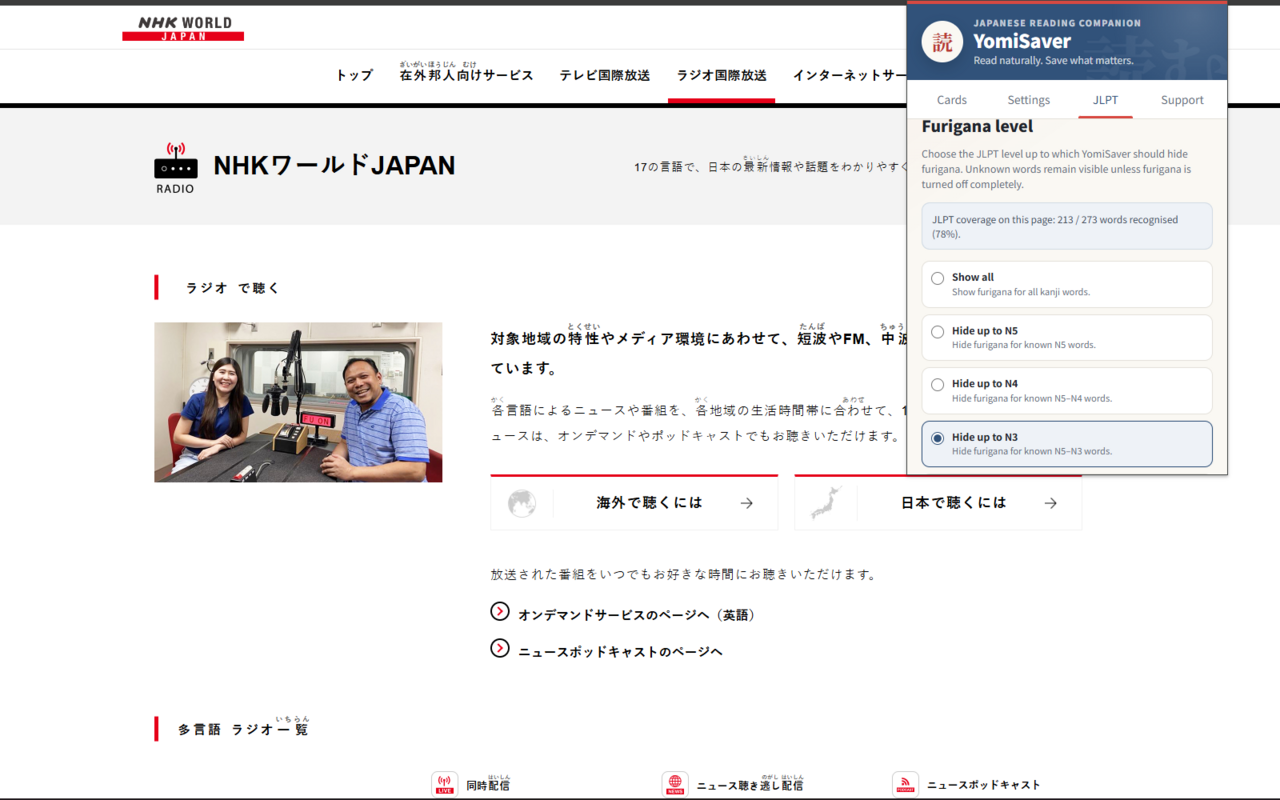
Furigana is useful, but showing it above every kanji indefinitely can become another dependency. YomiSaver therefore allows readers to show all readings, hide them completely, or hide furigana for vocabulary up to a selected JLPT level. The assistance behaves more like stabilisers on a bicycle than a permanent extra wheel: it can be withdrawn gradually as confidence grows.
3. Keep learning material portable
The extension can manage a useful vocabulary collection by itself, but it does not try to trap the learner inside a new ecosystem. Cards can be exported as Anki-compatible TSV, while complete backups can be exported and restored as JSON.
4. Treat privacy as part of the experience
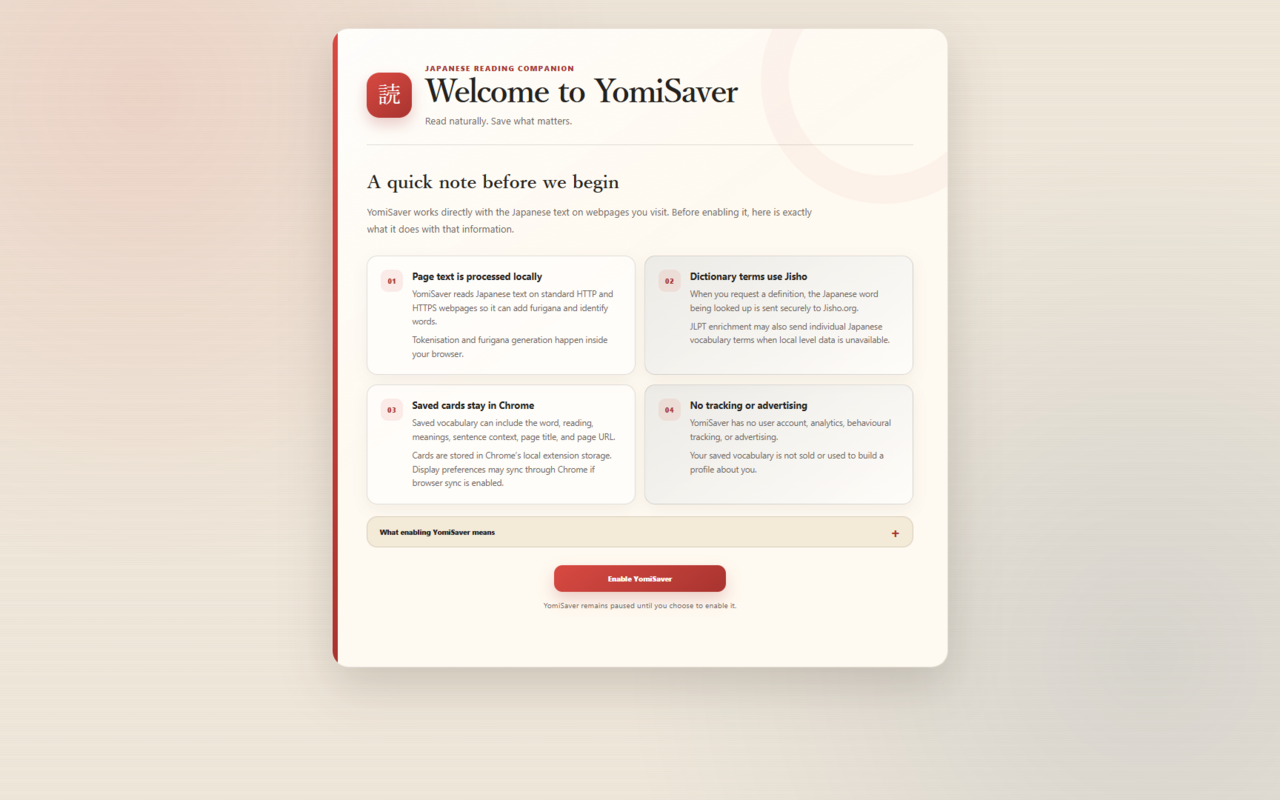
YomiSaver reads text on webpages, which is a significant capability even when used for a benign purpose. People should not have to infer what happens to that text. The product explains its behaviour during onboarding and remains paused until the user explicitly enables it.
5. Keep education accessible
I believe educational tools should be available regardless of whether somebody can afford another subscription. YomiSaver is free, contains no advertising, and does not sell or monetise user data. Ko-fi support is voluntary and does not unlock features or priority access.
These were not branding statements added after the build. They constrained technical and commercial decisions throughout it.
From a fragmented task into one product flow
The core experience became a simple loop:
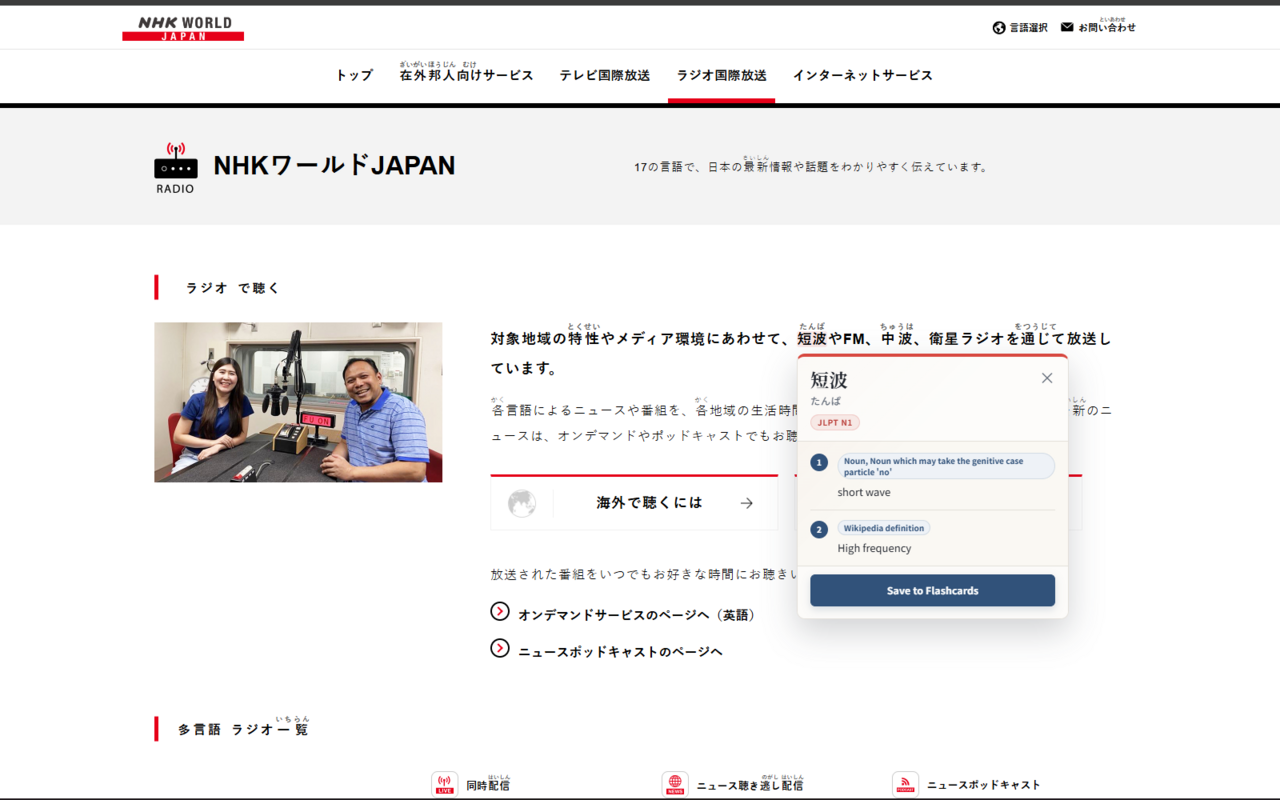
- Read: YomiSaver detects Japanese text and adds furigana according to the reader's chosen assistance level.
- Understand: hovering over a word reveals its reading, meanings, grammatical information and available JLPT level.
- Keep: the learner can save a useful word together with its sentence, page title and source URL.
- Review or transfer: saved vocabulary can be searched and managed in the extension, exported to Anki, or backed up for safekeeping.
The launch scope included:
- automatic furigana on ordinary Japanese webpages;
- configurable reading support using JLPT levels;
- a no-furigana mode for unaided practice;
- hover-based definitions and grammatical information;
- page-level JLPT dataset coverage;
- saving from the word popup or the browser's context menu;
- sentence, page title and source URL preservation;
- duplicate prevention;
- saved-card search and deletion;
- Anki-compatible export;
- complete JSON backup and restore;
- adjustable popup and text sizes; and
- first-run privacy onboarding.
Just as importantly, I did not put every possible language-learning feature into version 1. OCR, audio, a full spaced-repetition system and broader platform support could all be useful, but each would expand the product and its maintenance surface. The first release needed to prove the central reading loop before I added more machinery around it.
Building the first working product
The earliest public repository history begins in December 2024. I built YomiSaver as a Chrome Manifest V3 extension in JavaScript, using Kuromoji.js to tokenise Japanese text locally in the browser.
At a high level, the extension:
- walks eligible text nodes on a webpage;
- avoids code blocks, form controls, editable content and other elements that should not be modified;
- tokenises Japanese text into words and readings;
- inserts semantic
rubyandrtelements for furigana; - enriches tokens with local JLPT vocabulary data;
- applies the reader's chosen assistance threshold;
- sends only a requested word or short phrase to Jisho.org for a definition; and
- stores cards and context locally through Chrome's extension storage.
Dictionary lookup tries the visible form and base form of a token, normalises the response into a consistent internal model, and caches results to avoid unnecessary repeat requests. Preferences such as reading mode and display size can use Chrome Sync, while vocabulary, source context and consent records remain in local extension storage.
Webpack packages the content and popup scripts with the Kuromoji dictionary resources required for local tokenisation. A separate build script assembles the local JLPT reference data used by the reading filter.
The technical architecture reflects the product principles. Local tokenisation supports privacy and keeps the basic reading experience independent of a paid backend. A small external dictionary request supplies information that would be expensive to reproduce, but the extension does not send the complete page, saved vocabulary, sentence or source URL with that request.
Returning to the prototype: refactoring before expanding
The first prototype proved that the experience was possible, but it was not yet a product I was comfortable releasing.
AI-assisted experimentation had helped me reach a working proof of concept quickly, but it also left redundant packages, tightly coupled responsibilities and code that I did not want to carry unexamined into production. When I returned to the project in July 2026, I chose to reduce uncertainty before adding more features.
I audited the codebase and dependency graph, removed unused packages including aws-sdk, bluebird and request, cleaned up the Webpack configuration, and separated responsibilities into modules for tokenisation, furigana injection, JLPT filtering and enrichment, events, dictionary normalisation, popup utilities and token models.
I also improved the less glamorous parts of the experience:
- added clear inline success, warning and error states for imports and exports;
- added full backup restoration rather than export alone;
- improved duplicate handling and card management;
- generated and validated the JLPT dataset as part of the release build;
- disabled production source maps;
- corrected the workflow so generated
distfiles were rebuilt from source rather than edited directly; and - documented the development and release process for future maintenance.
That last point was a small but useful lesson. I briefly made visual changes inside the generated distribution folder, then realised they would be overwritten by the next build. Correcting the source-of-truth workflow mattered more than preserving the immediate change. A maintainable product is not only code that works today; it is a system in which the next change is predictable.
The final Chrome Store readiness branch contained 16 commits spanning functionality, onboarding, privacy, accessibility, build configuration, store material and production cleanup. The repository history preserves the work through a dedicated visual refresh pull request and Chrome Store readiness pull request.
Designing a tool that sits on top of somebody else's page
A browser extension does not begin with a blank canvas. YomiSaver has to coexist with websites whose typography, spacing, colours and layout I do not control.
The visual redesign therefore focused on making the injected interface feel distinctive without becoming loud. I developed a compact editorial system influenced by Japanese print design: warm paper-like surfaces, vermilion and indigo accents, and Noto Sans JP and Noto Serif JP for legibility across Japanese and Latin text.
The dictionary popup gives priority to the word and reading, followed by a small JLPT indicator, numbered definitions and the save action. The toolbar popup uses clear sections for Cards, Settings, JLPT controls and Support. Scrollbars are visually hidden where they would add noise, while scrolling remains available.
The redesign was not only cosmetic. I restructured the popup with clearer headings and descriptions, semantic navigation, improved button labels, ARIA labels, focus-visible states, loading and empty states, responsive wrapping, and adjustable text and popup sizes.
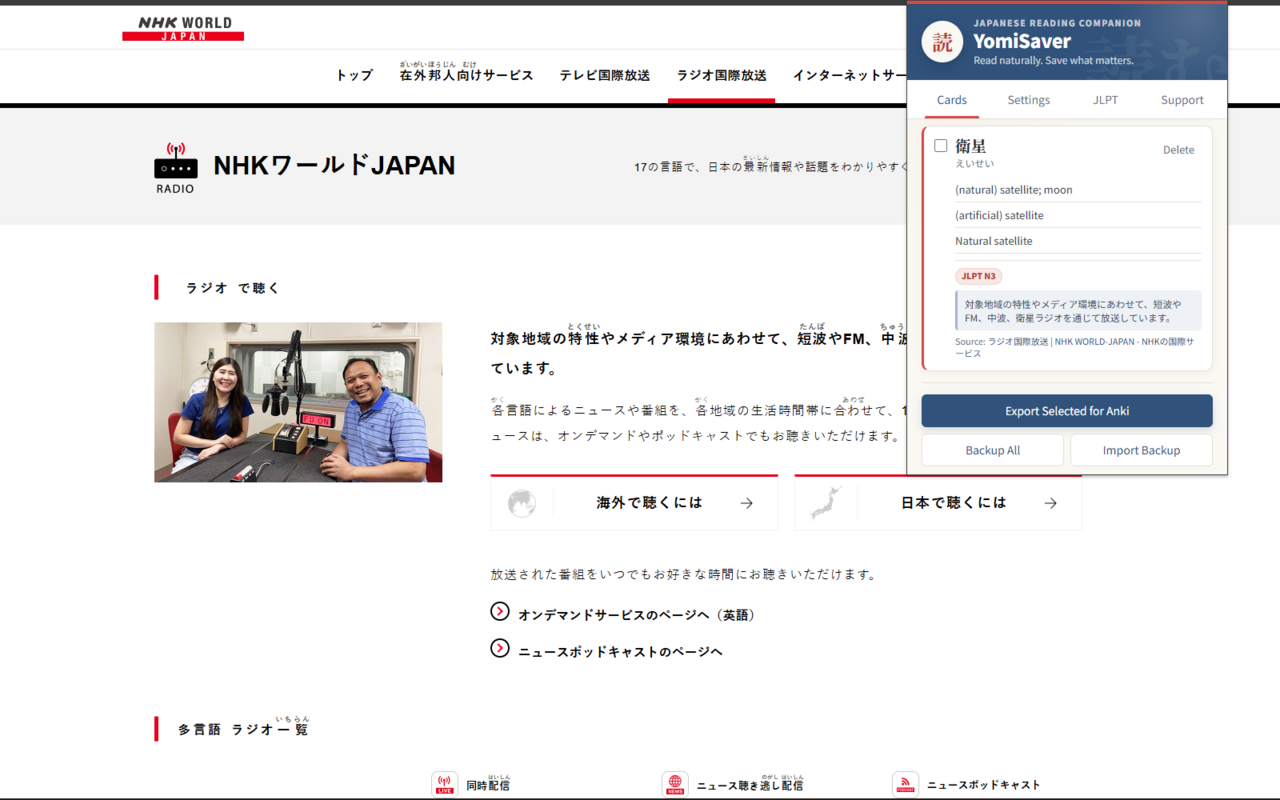
The aim was to create something that felt like a quiet layer of study paper placed over the web, rather than a second application demanding attention beside it.
Privacy as product architecture
Because YomiSaver operates on page content, privacy could not be relegated to a policy link at the bottom of a store listing.
The final design makes several concrete commitments:
- page tokenisation and furigana generation happen locally;
- only a requested word or short phrase is sent to Jisho.org over HTTPS;
- saved vocabulary, sentence context and source details remain in Chrome local storage;
- no developer-operated account or backend receives the vocabulary collection;
- the extension contains no advertising, behavioural tracking, profiling or product analytics;
- executable code and tokenizer resources are packaged with the extension rather than downloaded remotely; and
- page processing remains paused until the user acknowledges the privacy notice.
This created a real product trade-off. Refusing behavioural analytics means I cannot see how many cards people save, which reading levels they select or how often they return. I accepted that limitation rather than quietly collecting more data than the product needed.
It also means that post-launch decisions must combine aggregate Chrome Web Store data, voluntary feedback and carefully designed future research. Measurement should serve the learner; the learner should not become raw material for measurement.
Preparing for distribution
Getting YomiSaver into the Chrome Web Store was a separate phase of product work, not a final upload button.
I moved the extension to Manifest V3, reviewed its requested permissions, wrote a public privacy policy, documented the single-purpose use of page content, prepared permission justifications, explained external dictionary requests, declared the absence of remote executable code, and produced repeatable reviewer test instructions.
I also created the store description, icon, promotional image and four screenshots that explain the reading, lookup, card and privacy flows. The extension was released publicly as version 1.0.0 under the Exit Velocity publisher identity, with the source code licensed under MPL 2.0.
The administrative side included navigating unclear guidance around publisher and trader classification. It reinforced something easy to miss in side-project case studies: shipping is partly engineering, but it is also policy interpretation, risk communication, support escalation, documentation and persistence.
Launch: a deliberately quiet first month
YomiSaver launched publicly in late July 2026. I had previously shared work-in-progress material and made small launch posts to my existing network, but there was no paid promotion, advertising, creator outreach, partnership programme or sustained acquisition campaign.
For that reason, the first month is best described as predominantly organic discovery, not as a controlled marketing experiment. Chrome's aggregate dashboard does not provide enough attribution to prove where every user found the product.
That distinction matters. “Zero marketing” is a tempting headline, but “45 installs without paid acquisition or an ongoing campaign” is the more defensible and professionally useful result.
What the first 30 days tell me
Chrome Web Store data for 27 July to 25 August 2026 reported:
| Signal | Result | What it may mean |
|---|---|---|
| Install events | 45 | A small but genuine audience found a new, niche tool |
| Uninstall events | 1 | Very low early rejection, although this is not the same as cohort retention |
| Net install events | 44 | Positive first-month accumulation |
| Average installs per day | 1.5 | Discovery continued beyond a single launch spike |
| Days showing at least one install | Approximately 27 of 30 | The graph suggests a recurring trickle rather than one isolated burst |
| Installs from the United States | 87% | The first audience is heavily US-weighted |
| Installs on ChromeOS | 76% | Chromebook users appear unusually prominent |
| Installs on Windows | 11% | A smaller desktop segment is already present |
| Uninstall-to-install event ratio | 2.2% | Encouraging, but too early and too aggregate to call a retention rate |
The dashboard also displayed a 1,025% increase against the previous period. I would not use that figure in a portfolio headline because the comparison period largely predates the public launch. It is mathematically correct but analytically unhelpful.
The more interesting signal is the shape of the graph. Installs occurred on most days, including after the initial release window, and there was another three-install day near the end of the period. The first half of the month was stronger than the second, so some launch taper is visible, but discovery did not fall to zero.
The combination of a US-heavy audience and 76% ChromeOS usage raises a useful hypothesis: YomiSaver may be reaching learners in schools, colleges or other education contexts where Chromebooks are common. The data does not cross-tab region, device and user type, so this is a research question rather than a conclusion. It does, however, suggest where interviews, outreach or future store localisation could begin.
There are also things these numbers cannot tell me. An install is not an active user, and one uninstall does not prove long-term retention. I cannot currently see whether people complete onboarding, successfully use the JLPT controls, save a card, export to Anki or return a week later. The first month validates discovery and low immediate rejection; it does not yet validate habitual use.
Where the current trajectory may lead
Forecasting from one month and 45 installs should be treated as scenario planning rather than prediction.
The full-period run rate was 45 installs per month, while the second half of the graph produced roughly 16 installs in 15 days, equivalent to about 32 per month. That makes 25–35 new installs per month a reasonable unchanged-product baseline for the immediate future.
| Scenario if the product and promotion remain unchanged | Monthly installs | Approx. cumulative total after 3 more months | Approx. cumulative total after 6 more months |
|---|---|---|---|
| Conservative: launch visibility continues to fade | 15 | 90 | 135 |
| Baseline: recent organic run rate holds | 25–35 | 120–150 | 195–255 |
| Upside: first-month rate holds through academic-year discovery and word of mouth | 45 | 180 | 315 |
In the near term, that baseline would put YomiSaver at roughly 70–85 cumulative installs by late September 2026.
There are plausible reasons for an upside case: the start of the academic year, accumulating reviews, recommendations between learners, improved store ranking, or the product appearing in educator and Japanese-learning communities. There are equally plausible reasons for the conservative case: the launch tail may decay, a niche English-only listing may reach its current discoverable audience, and Chrome Store visibility does not automatically compound.
The correct product response is not to optimise for a fanciful 100,000-user story. It is to learn why the first 45 people installed it, whether it became part of their reading practice, and which users received the most value. If YomiSaver reaches 100 or 200 users with the same low uninstall signal and evidence of repeated use, that will be a more meaningful foundation for growth.
What comes next
The next stage should balance validation with selective expansion.
1. Learn from the first users
I would add a clearly optional feedback route and conduct a small number of observed reading sessions with learners at beginner, intermediate and advanced levels. The priority questions are:
- Do people understand the JLPT assistance model without explanation?
- Does the injected furigana improve reading flow or create visual overload?
- Can users save, find and export a word without losing their place?
- What do ChromeOS users use YomiSaver for, and are they studying independently or in education?
- Which webpages expose performance or compatibility problems?
2. Measure only what is necessary
The next dashboard review should track store impressions, listing-to-install conversion, aggregate users and uninstall trends alongside qualitative feedback. I would not introduce behavioural tracking simply to fill a chart. If any in-product research is added, it should be voluntary, minimal and explained as clearly as the current dictionary requests.
3. Explore local-first OCR as the next differentiator
The most promising post-launch concept is user-initiated screen-capture OCR. A learner could capture Japanese text in an image, receive detected words with furigana, definitions and JLPT levels, and choose individual vocabulary cards to add to the same collection.
The important constraint is philosophical as much as technical: OCR should not introduce a recurring backend cost, paid gate or unnecessary image upload. A local or on-device approach would preserve YomiSaver's free, privacy-first model. This needs a technical prototype and usability testing before it becomes a roadmap commitment, particularly around OCR accuracy, vertical text, furigana recognition and extension performance.
4. Strengthen the existing loop before broadening it
Compatibility, performance, onboarding clarity and export reliability should remain ahead of decorative or ecosystem features. YomiSaver is strongest when it behaves like one well-made tool rather than a collection of language-learning features competing for attention.
What I learned
Lived experience can reveal a deep problem, but it does not remove the need for research
Knowing the frustration intimately helped me see details that a shallow market exercise might miss. It also made it important to state where evidence ended and assumption began.
A feature is also a policy decision
Saving context affects storage. Processing webpages affects permissions and consent. Export affects portability. Analytics affects trust. Product, engineering and privacy could not be separated into independent columns.
Prototypes and products need different standards
The early AI-assisted code was valuable because it made the concept tangible. Production readiness required me to audit it, remove what I did not need, understand the remaining dependencies, modularise the architecture and document the release process.
Distribution is part of the product lifecycle
Store policy, publisher status, screenshots, privacy copy and reviewer instructions were not administrative debris around the “real” build. They determined whether anybody could safely find and install it.
Small numbers can still contain useful signals
Forty-five installs do not prove product-market fit. They do prove that people outside my direct circle can discover a very specific tool, understand enough of its promise to install it, and rarely reject it immediately. The professional response is neither to dismiss that nor inflate it, but to decide what evidence to seek next.
Outcome
YomiSaver is now a real, publicly available product rather than a local prototype. It brings together automatic reading assistance, progressive JLPT-based scaffolding, contextual dictionary lookup, portable vocabulary capture and a transparent privacy model in one free extension.
The project demonstrates my ability to take a product through its complete lifecycle:
- identify and articulate a human problem;
- analyse an existing product landscape without inventing a false gap;
- define principles and prioritise a coherent first release;
- design an accessible interaction and visual system;
- build and refactor the underlying software;
- make privacy and portability architectural requirements;
- navigate release policy and distribution;
- interpret early data without overstating it; and
- turn what I learn into the next set of product questions.
Most importantly, it solves a problem I had experienced for more than a decade in a way that reflects the kind of products I want to make: useful, humane, technically grounded, respectful of the people using them, and available without turning their attention or data into the price of entry.